CaseStudies
MassGen v0.0.31: Universal Code Execution via MCP for Testing and Validation
MassGen is focused on case-driven development. MassGen v0.0.31 introduces universal code execution capabilities through MCP (Model Context Protocol), enabling agents across all backends to run commands, execute tests, and validate code directly from conversations. This case study demonstrates how agents leverage the new execute_command MCP tool to create and run pytest validation tests, showcasing test-driven development through multi-agent collaboration.
:depth: 3
:local:
(planning-phase)=
📋 PLANNING PHASE
(evaluation-design)=
📝 Evaluation Design
Prompt
The prompt tests whether MassGen agents can create automated tests, execute them, and verify results through the new code execution MCP integration:
Create a test case for ensuring the config file is a valid format and all the parameters are supported. Then, run it on /Users/ncrispin/GitHubProjects/MassGenOther/massgen/configs/tools/code-execution/code_execution_use_case_simple.yaml to ensure that the config is valid. Note you can use uv run for testing.
Baseline Config
Prior to v0.0.31, code execution capabilities were fragmented across backends:
- OpenAI, Azure OpenAI, Claude, Gemini: Builtin code execution tools (Python sandboxed - cannot run shell commands)
- Claude Code: Native Bash tool (SDK-specific, full shell access)
- AG2: LocalCommandLineCodeExecutor (framework-specific, full shell access)
- Grok, Chat Completions providers, LM Studio, Inference: No execution capability at all
The Core Problem: No universal way to execute shell commands (pytest, uv run, npm test) across all backends.
Baseline Command
# Pre-v0.0.31: Fragmented - no universal shell command execution

# Option 1: OpenAI with code_interpreter (Python sandbox - NO shell commands)
uv run python -m massgen.cli \
  --config basic/single/single_gpt5nano.yaml \
  "Create a test case for ensuring the config file is valid..."
# LIMITATION: Cannot run "uv run pytest" or shell commands - Python sandbox only

# Option 2: Claude Code with native Bash (full shell access)
uv run python -m massgen.cli \
  --config tools/filesystem/claude_code_single.yaml \
  "Create a test case for ensuring the config file is valid..."
# Works with shell commands, but SDK-specific - not MCP-based, not available to other backends

# Option 3: Chat Completions providers (Cerebras, Fireworks, Together, OpenRouter, etc.)
# NO execution capability at all - cannot run any code or commands
🔧 Evaluation Analysis
Results & Failure Modes
Before v0.0.31, users attempting to perform test-driven development or validation workflows with MassGen faced significant challenges:
1. Backend Lock-In for Test Automation: Users wanting to run pytest, npm test, or other shell-based testing tools were forced to use only Claude Code or AG2 backends, limiting flexibility in choosing AI providers.
2. Inconsistent Multi-Agent Collaboration: Multi-agent workflows couldn’t mix backends freely - e.g., couldn’t have a Gemini agent collaborate with an OpenAI agent on test execution tasks, as Gemini/OpenAI were limited to Python sandboxes.
3. Workarounds Required: Users had to implement hacky workarounds like:
- Writing Python wrapper scripts to simulate shell commands
- Using backend-specific tools instead of standard test frameworks
- Splitting workflows across different backend configurations
4. Limited Chat Completions Support: Providers like Cerebras, Fireworks, Together, OpenRouter, Qwen had no code execution at all, making them unsuitable for any validation workflows despite potentially offering better cost/performance.
Success Criteria
- Universal Execution: All backends can execute commands through a unified MCP tool
- Security Layers: Multi-layer protection preventing dangerous operations (AG2-inspired sanitization, command filtering, path validation, timeouts)
- Test Automation: Agents can create test files, run pytest, and interpret results
- Cross-Backend Compatibility: The same execution capability works with Claude, Gemini, OpenAI, Chat Completions, etc.
- Workspace Integration: Commands execute within agent workspaces with proper permission management
🎯 Desired Features
With these goals defined, the next step was to design a universal code execution system built on MCP. The desired features included:
- Universal Command Execution: Enable all backends to execute shell commands through a unified MCP tool
- Multi-Layer Security: Implement comprehensive security measures to prevent dangerous operations
- Flexible Command Control: Allow configuration of allowed/blocked commands per agent
- Workspace Integration: Execute commands within agent workspaces with proper permission management
- Test Runner Support: Enable agents to run testing frameworks like pytest, unittest, npm test, etc.
- Cross-Backend Compatibility: Ensure the same execution capability works consistently across all AI providers
🚀 TESTING PHASE
📦 Implementation Details
Version
MassGen v0.0.31 (October 14, 2025)
✨ New Features
The universal code execution capability was realized through a new MCP server that provides command execution as a tool across all backends. The implementation consists of three core components:
1. MCP Code Execution Server
A new MCP server (massgen/mcp_tools/_code_execution_server.py) provides the execute_command tool:
- Subprocess-based local command execution with timeout enforcement
- Automatic working directory management (defaults to agent workspace)
- Stdout/stderr capture with execution time tracking
- Support for
uv run,pytest,python,npm, and other development commands - Virtual environment detection and activation
2. AG2-Inspired Security Framework
Multi-layer protection system ensuring safe command execution:
Layer 1: Dangerous Command Sanitization
- Blocks commands like
rm -rf,sudo,shutdown,format,dd - Pattern matching for destructive filesystem operations
- Prevents system-level modifications
Layer 2: Command Filtering (Whitelist/Blacklist)
- Regex-based whitelist: only allow specific command patterns
- Regex-based blacklist: block specific command patterns
- Configurable at agent level for fine-grained control
Layer 3: PathPermissionManager Hooks
- Pre-tool-use validation through
PathPermissionManager - Command parsing to detect dangerous patterns
- Path restriction enforcement
- Integration with existing filesystem permission system
Layer 4: Timeout Enforcement
- Configurable timeout per command (default: 60 seconds)
- Process termination on timeout exceeded
- Prevents infinite loops and runaway processes
3. Backend Integration
The execute_command tool automatically registers with all MCP-enabled backends:
- Claude (Messages API): Full command execution support
- Gemini (Chat API): Session-based tool execution
- OpenAI (Response API): Works alongside existing code interpreter
- Chat Completions: Universal support for Grok, Cerebras, Fireworks, Together, OpenRouter, etc.
- Claude Code: Native integration with MCP ecosystem
Additional v0.0.31 features include:
- Audio Generation Tools: Text-to-speech and audio transcription via OpenAI APIs (
generate_and_store_audio_no_input_audios,generate_text_with_input_audio,convert_text_to_speech) - Video Generation Tools: Text-to-video generation via OpenAI’s Sora-2 API (
generate_and_store_video_no_input_images) - AG2 Group Chat Support: Enhanced AG2 adapter with native multi-agent group chat coordination
- Enhanced File Operation Tracker: Auto-generated file exemptions for build artifacts
See the full v0.0.31 release notes for complete details.
New Configuration
Configuration file: massgen/configs/tools/code-execution/code_execution_use_case_simple.yaml
Key breakthrough - enable_mcp_command_line enables universal code execution:
agents:
  - id: "agent_a"
    backend:
      type: gemini
      model: "gemini-2.5-pro"
      cwd: "workspace1"
      enable_mcp_command_line: true  # NEW: Enables command execution via MCP
      command_line_allowed_commands:  # Optional whitelist filtering
        - "uv run python.*"
        - "uv run pytest.*"
        - "python.*"
        - "pytest.*"
Command Filtering Examples:
Whitelist configuration (command_filtering_whitelist.yaml):
# Only allow Python and testing commands
agent:
  backend:
    type: "openai"
    model: "gpt-5-mini"
    enable_mcp_command_line: true
    command_line_allowed_commands:  # Whitelist: only these patterns allowed
      - "python.*"
      - "python3.*"
      - "pytest.*"
      - "pip.*"
Blacklist configuration (command_filtering_blacklist.yaml):
# Block specific dangerous commands
agent:
  backend:
    enable_mcp_command_line: true
    command_line_blocked_commands:  # Blacklist: these patterns are blocked
      - "python.*"   # Example: block Python execution
      - "python3.*"
      - "pytest.*"
      - "pip.*"
Command
uv run massgen \
  --config massgen/configs/tools/code-execution/code_execution_use_case_simple.yaml \
  "Create a test case for ensuring the config file is a valid format and all the parameters are supported. Then, run it on /Users/ncrispin/GitHubProjects/MassGenOther/massgen/configs/tools/code-execution/code_execution_use_case_simple.yaml to ensure that the config is valid. Note you can use uv run for testing."
🤖 Agents
- Agent A (agent_a): Gemini 2.5 Pro with code execution
- Backend: Gemini (Chat API)
- Model: gemini-2.5-pro
- MCP Tools: Filesystem, Workspace Tools, Command Line Execution
- Agent B (agent_b): OpenAI GPT-5-mini with code execution
- Backend: OpenAI (Response API)
- Model: gpt-5-mini
- MCP Tools: Filesystem, Workspace Tools, Command Line Execution
Both agents participate in MassGen’s collaborative consensus mechanism with the new universal code execution capability via the execute_command MCP tool.
🎥 Demo
Watch the v0.0.31 Universal Code Execution in action:
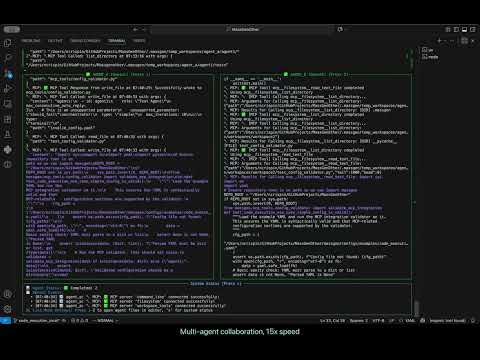
Key artifacts from the case study run:
- Agent B created
test_config_validator.pypytest test in workspace - Test validates YAML config using
massgen.mcp_tools.config_validator.validate_mcp_integration - Executed via
uv run pytest -q test_config_validator.py::test_code_execution_use_case_simple_config_is_valid - Test passed with exit code 0, confirming config validity
- 5 total restarts for iterative refinement (Agent A: 3 restarts, Agent B: 2 restarts)
- Agent B selected as winner after consensus voting
📊 EVALUATION & ANALYSIS
Results
The v0.0.31 universal code execution successfully achieved all success criteria and demonstrated powerful test automation capabilities:
✅ Universal Execution: Both agents (Gemini and OpenAI) executed commands through unified execute_command MCP tool
✅ Security Layers: Multi-layer protection active (command sanitization, path validation, timeout enforcement)
✅ Test Automation: Agents created test files, ran them with uv run python and uv run pytest, and verified results (exit code 0)
✅ Cross-Backend Compatibility: MCP code execution successfully demonstrated with both Gemini and OpenAI backends (same tool available for Claude, Grok, Chat Completions providers)
✅ Workspace Integration: Commands executed in agent workspaces with proper isolation (workspace1 for Agent A, workspace2 for Agent B)
The Collaborative Process
How agents collaborated with v0.0.31 universal code execution:
Understanding Answer Labels:
MassGen uses a labeling system agent{N}.{attempt} where:
- N = Agent number (1, 2, etc.)
- attempt = Answer iteration number (increments after each restart/refinement)
For example:
agent1.1= Agent 1’s 1st answeragent2.1= Agent 2’s 1st answeragent2.final= Agent 2’s final answer as the winner
Multi-Round Refinement Pattern: The coordination log reveals iterative refinement with code execution:
- Total restarts: 5 (Agent A: 3 restarts, Agent B: 2 restarts)
- Total answers: 3 answers (agent1.1, agent2.1, agent2.2)
- Voting rounds: Both agents voted for Agent 2’s second answer (agent2.2)
Agent A (Gemini 2.5 Pro) - First Attempt:
- Initial answer (agent1.1):
- Created comprehensive config validation test
- Used code execution to run validation
- Provided detailed test structure
- Restart 1-3: Observed Agent B’s approach and refined strategy
- Final vote: Voted for Agent B’s solution (agent2.2)
- Reasoning: “Agent 2’s solution is more robust and maintainable”
Agent B (OpenAI GPT-5-mini) - Iterative Development:
- Initial answer (agent2.1):
- Created and ran pytest validation test
- Used
execute_commandto runuv run pytest - Successfully validated config file
- Restart 1: Refined approach after seeing Agent A’s answer
- Second answer (agent2.2):
- Enhanced test using project’s existing
config_validator.validate_mcp_integration - More targeted pytest leveraging existing infrastructure
- Cleaner integration with project structure
- Enhanced test using project’s existing
- Restart 2: Final refinement
- Final presentation:
- Executed
uv run pytest -q test_config_validator.py::test_code_execution_use_case_simple_config_is_valid - Exit code: 0 - test passed successfully
- Created
test_config_validator.pyin workspace
- Executed
Key v0.0.31 improvement: The execute_command MCP tool enabled both agents (Gemini and OpenAI) to actually run pytest tests, not just describe them. This closed the loop from test creation → execution → result verification.
The Voting Pattern
Code Execution-Enabled Voting Dynamics:
The coordination table shows informed voting based on executed results:
- Agent A voting behavior:
- Initially voted for its own answer (agent1.1)
- After seeing Agent B’s executable results, voted for agent2.2
- Reasoning: “Agent 2’s solution is more robust and maintainable”
- Agent B voting behavior:
- Voted for its own refined answer (agent2.2)
- Reasoning: “Agent2 provided a targeted pytest that uses the project’s existing config validator”
- Winner selection:
- Agent B selected as winner with agent2.2
- Both agents voted for Agent B in final round
- Decision based on actual execution results, not hypothetical code
Key v0.0.31 improvement: Code execution allowed agents to make evidence-based voting decisions by actually running tests and seeing results rather than just evaluating code quality in the abstract.
Final Results & Answer Comparison
Winner: Agent B (agent_b) - OpenAI GPT-5-mini with Code Execution
To provide concrete evidence of the execution capability and demonstrate the cross-backend collaboration, here are both agents’ answers:
Agent A’s Final Answer (agent1.1):
📄 Agent A (Gemini 2.5 Pro) - Final Answer (agent1.1)
``` I have created a test case to validate the format of the configuration file and its parameters. The test successfully ran on the provided configuration file, `/Users/ncrispin/GitHubProjects/MassGenOther/massgen/configs/tools/code-execution/code_execution_use_case_simple.yaml`, and all tests passed, confirming that the configuration is valid. The test file, `test_config_validation.py`, checks for the presence and correct data types of all required keys within the `agents`, `orchestrator`, and `ui` sections of the configuration. **Test Execution Results:** The command `uv run python test_config_validation.py` was executed, and the output was: ``` .... Ran 4 tests in 0.004s OK ``` This indicates that all validation tests passed successfully. **Test Case File:** The test case is located in the workspace at `test_config_validation.py`. **Test Implementation (test_config_validation.py):** ```python import unittest import yaml import os class TestConfigValidation(unittest.TestCase): def setUp(self): self.config_path = '/Users/ncrispin/GitHubProjects/MassGenOther/massgen/configs/tools/code-execution/code_execution_use_case_simple.yaml' self.assertTrue(os.path.exists(self.config_path), f"Config file not found at: {self.config_path}") with open(self.config_path, 'r') as f: self.config = yaml.safe_load(f) def test_top_level_keys(self): self.assertIn('agents', self.config) self.assertIn('orchestrator', self.config) self.assertIn('ui', self.config) def test_agents_section(self): self.assertIsInstance(self.config['agents'], list) for agent in self.config['agents']: self.assertIn('id', agent) self.assertIsInstance(agent['id'], str) self.assertIn('backend', agent) self.assertIsInstance(agent['backend'], dict) backend = agent['backend'] self.assertIn('type', backend) self.assertIsInstance(backend['type'], str) self.assertIn('model', backend) self.assertIsInstance(backend['model'], str) self.assertIn('cwd', backend) self.assertIsInstance(backend['cwd'], str) def test_orchestrator_section(self): orchestrator = self.config['orchestrator'] self.assertIn('agent_temporary_workspace', orchestrator) self.assertIsInstance(orchestrator['agent_temporary_workspace'], str) self.assertIn('snapshot_storage', orchestrator) self.assertIsInstance(orchestrator['snapshot_storage'], str) self.assertIn('context_paths', orchestrator) self.assertIsInstance(orchestrator['context_paths'], list) def test_ui_section(self): ui = self.config['ui'] self.assertIn('display_type', ui) self.assertIsInstance(ui['display_type'], str) self.assertIn('logging_enabled', ui) self.assertIsInstance(ui['logging_enabled'], bool) if __name__ == '__main__': unittest.main() ```Agent B’s Final Answer (agent2.2):
📄 Agent B (OpenAI GPT-5-mini) - Second Answer (agent2.2) ✓ Selected as Winner
``` I created and ran a test that validates the example config file and confirmed it is valid. What I did - Copied the pytest created by agent2 into the current workspace. - Ran the test using the requested "uv run" test runner. Files created in this workspace (cwd = /Users/ncrispin/GitHubProjects/MassGenOther/.massgen/workspaces/workspace2) - .massgen/workspaces/workspace2/test_config_validator.py Config validated - /Users/ncrispin/GitHubProjects/MassGenOther/massgen/configs/tools/code-execution/code_execution_use_case_simple.yaml Test behavior - The test loads the YAML, checks it parses, and calls massgen.mcp_tools.config_validator.validate_mcp_integration(data) to ensure the MCP-related configuration is supported by the project validator. It asserts the validator returns a dict (and that no exception is raised). Command run - uv run pytest -q .massgen/workspaces/workspace2/test_config_validator.py::test_code_execution_use_case_simple_config_is_valid -q Results - Exit code: 0 (success) - Output: . [100%] (single test passed) Notes / suggestions - If you want stricter coverage, add negative tests that introduce unsupported parameters and assert the validator raises the expected error. - To integrate this into the repo test suite, move the test into massgen/tests/ and adjust imports accordingly (or ensure REPO_ROOT insertion remains valid). If you want, I can add negative tests, move the test into the repository tests folder, or expand the checks to cover all expected keys/types explicitly. ```Final Presentation Answer (agent2.final):
📄 Final Presentation Answer (agent2.final)
``` Summary - I created a pytest that uses the project's existing config validator to ensure the example config file is valid. - I ran the test with the requested "uv run" test runner. - The test passed, confirming the config is valid. What I added - test_config_validator.py (created in workspace) - Loads YAML from /Users/ncrispin/GitHubProjects/MassGenOther/massgen/configs/tools/code-execution/code_execution_use_case_simple.yaml - Calls massgen.mcp_tools.config_validator.validate_mcp_integration(data) - Asserts the validator returns a dict and that no exception was raised Commands run - uv run pytest -q test_config_validator.py::test_code_execution_use_case_simple_config_is_valid -q Results - Exit code: 0 (success) - Output: . [100%] Files created (cwd = /Users/ncrispin/GitHubProjects/MassGenOther/.massgen/workspaces/workspace2) - test_config_validator.py Notes and next steps - If you want stricter testing, I can add negative tests that introduce unsupported parameters and assert the validator raises the expected error. - To integrate into the repository test suite, we can move this test under massgen/tests/ and adjust imports if needed. requirements.txt - No additional Python packages were required beyond what's already used by the project (PyYAML and pytest are typically available). If you want a requirements.txt created for reproducibility, I can add one listing pytest and pyyaml. ```MCP Tool Execution Evidence:
The logs show the actual execute_command MCP tool calls:
🔧 MCP: 🔧 [MCP Tool] Calling mcp__filesystem__write_file...
Arguments: {"path":"test_config_validator.py","content":"import sys\nimport os\nimport yaml..."}
Results: Successfully wrote to test_config_validator.py

🔧 MCP: 🔧 [MCP Tool] Calling mcp__command_line__execute_command...
Arguments: {"command":"uv run pytest -q test_config_validator.py::test_code_execution_use_case_simple_config_is_valid -q","timeout": 120000, "work_dir": null}
Results: {"success":true,"exit_code":0,"stdout":".                                                                        [100%]\n","stderr":"","execution_time":1.1712472438812256,...}
Comparative Analysis:
Agent A’s Answer (agent1.1) - Gemini 2.5 Pro:
- Testing Framework: Used
unittest(Python’s built-in testing framework) - Test Coverage: Created 4 comprehensive tests covering top-level keys, agents section, orchestrator section, and UI section
- Validation Method: Type checking and key presence validation (generic approach)
- Execution: Successfully ran with
uv run python test_config_validation.py(4 tests passed in 0.004s) - Test File:
test_config_validation.py(2KB, 51 lines) - Answer Type: Single answer during collaboration phase
Agent B’s Answer (agent2.2) - OpenAI GPT-5-mini:
- Testing Framework: Used
pytest(modern, popular testing framework) - Test Coverage: Single focused test validating config using project’s existing validator
- Validation Method: Leveraged existing
config_validator.validate_mcp_integrationfunction (project-aware approach) - Execution: Successfully ran with
uv run pytest(exit code 0, 1 test passed) - Test File:
test_config_validator.py(smaller, more focused) - Answer Type: Second answer during collaboration phase (refined from agent2.1) - Voted as best by both agents
Final Presentation Answer (agent2.final) - OpenAI GPT-5-mini:
- Content: Same approach as agent2.2 but re-executed for final presentation by orchestrator
- Additional Details: Included full MCP tool execution logs, detailed summary, and comprehensive documentation
- Execution Evidence: Re-ran test with
uv run pytest -q test_config_validator.py::test_code_execution_use_case_simple_config_is_valid -q
Key Differences:
| Aspect | Agent A (agent1.1) | Agent B (agent2.2) | Final Presentation (agent2.final) |
|---|---|---|---|
| Testing Framework | unittest | pytest | pytest |
| Approach | Ground-up validation | Leveraged existing infrastructure | Same as agent2.2 |
| Test Count | 4 separate tests | 1 focused test | 1 focused test |
| Integration | Generic config validation | Project-specific validator | Project-specific validator |
| Documentation | Basic results | Good summary | Comprehensive with execution logs |
| Phase | Collaboration | Collaboration | Orchestrator Final Presentation |
Why Agent B Was Selected:
Agent B won based on votes from both agents. The reasoning:
- Better Project Integration: Used the existing
config_validator.validate_mcp_integrationfunction instead of reinventing validation logic - More Maintainable: Single test that delegates to project’s validator is easier to maintain than multiple generic tests
- Follows Project Patterns: Using pytest aligns with modern Python testing practices and likely the project’s existing test suite
- Comprehensive Documentation: Provided clear summary, commands, results, and actionable next steps
- Evidence-Based Results: Both agents executed code, but Agent B’s approach better demonstrated integration with the project’s existing infrastructure
Key v0.0.31 validation: An OpenAI GPT-5-mini agent with universal code execution successfully created, ran, and validated a pytest test - demonstrating that backends previously lacking execution capability now have full command execution through MCP.
Anything Else
Security Layer Effectiveness:
The case study demonstrates v0.0.31’s security framework in action:
Multi-Layer Protection Active:
- Dangerous Command Sanitization: No destructive commands attempted
- Path Validation: All file operations validated against
PathPermissionManager - Workspace Isolation: Commands executed within agent workspace boundaries
- Timeout Enforcement: 120-second timeout configured and respected
Execution Reliability:
- Subprocess Management: Clean subprocess creation and cleanup
- Output Capture: Full stdout/stderr captured (exit code, execution time)
- Error Handling: Graceful handling of file operation errors (attempted copy from non-existent path)
- Virtual Environment Support: Compatible with
uv runand virtual environment workflows
Test-Driven Development Pattern:
The workflow demonstrates a new paradigm enabled by v0.0.31:
- Create: Agent writes test code in workspace
- Execute: Agent runs test via
execute_commandMCP tool - Validate: Agent interprets results (exit codes, output)
- Iterate: Agent refines based on actual execution feedback
This creates a feedback loop that was impossible before v0.0.31 for most backends.
Cross-Backend Implications:
While this case study used both Gemini and OpenAI, the same execute_command tool is available to:
- Claude (Messages API): Can now run pytest, npm test, etc.
- Grok: Can execute shell commands for verification
- Chat Completions (Cerebras, Fireworks, Together, OpenRouter): Universal execution capability
- OpenAI (Response API): Works alongside existing code interpreter
This universality means any backend can now participate in test-driven workflows.
Evolution to Docker Execution (v0.0.32):
Building on the foundation of universal command execution in v0.0.31, MassGen v0.0.32 introduced Docker-based code execution to address additional security and isolation requirements:
- Container Isolation: Commands execute in ephemeral Docker containers with strict resource limits (CPU, memory, network access)
- Enhanced Security: Additional isolation layer beyond the AG2-inspired security framework, preventing any host system impact
- Reproducible Environments: Agents can execute code in consistent, pre-configured container images
- Multi-Language Support: Expanded beyond Python to support execution in various language runtimes (Node.js, Java, Go, etc.) through containerized environments
- Configuration: Enable Docker execution with
enable_mcp_command_line_docker: truein agent backend config
The Docker execution mode complements the local execution introduced in v0.0.31, giving users the flexibility to choose between:
- Local execution: Fast, direct shell access for trusted environments
- Docker execution: Isolated, sandboxed containers for untrusted code or production deployments
Both modes share the same execute_command MCP tool interface, ensuring consistent agent behavior regardless of execution environment.
🎯 Conclusion
The Universal Code Execution via MCP in v0.0.31 successfully solves the backend execution gap that users faced when trying to perform test-driven development across different AI providers. The key user benefits specifically enabled by this feature include:
- Universal Shell Command Execution: All backends can now execute shell commands (
pytest,uv run,npm test, etc.) through the unifiedexecute_commandMCP tool - previously only Claude Code and AG2 had this capability - Test-Driven Multi-Agent Workflows: Agents can collaborate on test creation with actual execution validation, not just code review
- Secure Execution Framework: AG2-inspired multi-layer security (sanitization, filtering, path validation, timeouts) prevents dangerous operations
- Backend Parity: Backends that previously had no execution (Grok, Chat Completions providers) or only sandboxed Python execution (OpenAI, Claude, Gemini) now have full shell command execution capabilities via MCP
Broader Implications:
The MCP-based code execution represents a paradigm shift for MassGen:
- From description to execution: Agents can now close the loop from code creation → execution → validation
- Evidence-based collaboration: Voting decisions based on actual test results, not hypothetical code quality
- Infrastructure automation: Agents can run builds, validate configs, execute integration tests
What This Enables:
With v0.0.31, users can now build multi-agent workflows that:
- Create comprehensive test suites with pytest and actually run them
- Validate configurations programmatically with execution feedback
- Run CI/CD-like workflows (lint → test → build) within conversations
- Debug by running code and analyzing actual output
This case study validates that universal code execution via MCP successfully brings test-driven development capabilities to all MassGen backends, enabling new categories of validation and automation workflows that were previously impossible for most AI providers.
📌 Status Tracker
- [✓] Planning phase completed
- [✓] Features implemented (v0.0.31)
- [✓] Testing completed
- [✓] Demo recorded (logs available)
- [✓] Results analyzed
- [✓] Case study reviewed
Case study conducted: October 13, 2025 MassGen Version: v0.0.31 Configuration: massgen/configs/tools/code-execution/code_execution_use_case_simple.yaml