CaseStudies
MassGen v0.0.16: Unified Filesystem Support with MCP Integration
MassGen v0.0.16 introduces unified filesystem support for Gemini agents through MCP (Model Context Protocol) integration, enabling cross-backend collaboration between Gemini and Claude Code agents with shared workspace management. This case study demonstrates the new filesystem capabilities through a complex educational content creation task.
:depth: 3
:local:
📋 PLANNING PHASE
📝 Evaluation Design
Prompt
“Create a presentation that teaches a reinforcement learning algorithm and output it in LaTeX Beamer format. No figures should be added.”
Baseline Config
Prior to v0.0.16, Gemini agents had no filesystem access capabilities, making them unable to create files or collaborate with Claude Code agents that rely on workspace sharing.
agents:
  - id: "gemini_agent"
    backend:
      type: "gemini"
      model: "gemini-2.5-pro"

  - id: "claude_code"
    backend:
      type: "claude_code"
      model: "claude-sonnet-4-20250514"
      cwd: "claude_code_workspace"

orchestrator:
    snapshot_storage: "snapshots"  # Directory to store workspace snapshots
    agent_temporary_workspace: "temp_workspaces"  # Directory for temporary agent workspaces

ui:
  display_type: "rich_terminal"
  logging_enabled: true
Baseline Command
massgen --config @examples/tools/mcp/gemini_mcp_filesystem_test_with_claude_code "Create a presentation that teaches a reinforcement learning algorithm and output it in LaTeX Beamer format. No figures should be added."
🔧 Evaluation Analysis
Results & Failure Modes
Before v0.0.16, MassGen had fundamental disparities between backends:
- Filesystem Access Gap: Only Claude Code agents had built-in filesystem tools (Read, Write, Edit, etc.)
- No Cross-Backend Collaboration: Gemini agents couldn’t participate in file-based workflows
- Workspace Isolation: No shared workspace management between different backend types
- Limited MCP Filesystem Integration: No unified approach to filesystem operations via MCP
Success Criteria
The unified filesystem support would be considered successful if:
- Backend Parity: Gemini agents gain equivalent filesystem capabilities to Claude Code agents
- Cross-Backend Workspace Sharing: Seamless file sharing between Gemini and Claude Code agents
- MCP Integration: Clean MCP-based filesystem operations for extensibility
- Unified Configuration: Identical
cwdand workspace configuration syntax across backends - Collaborative Workflows: Multi-backend agents working on shared files and projects
🎯 Desired Features
- FilesystemManager Class: Unified filesystem management for all backends with MCP integration
- Cross-Backend Workspace Sharing: Automatic workspace synchronization between different agent types
- Identical Configuration Syntax: Same
cwdparameter support for Gemini as Claude Code - MCP-Based File Operations: Clean abstraction layer for filesystem operations through MCP protocol
- Enhanced Orchestration: Intelligent workspace management and agent coordination
🚀 TESTING PHASE
📦 Implementation Details
Version
MassGen v0.0.16 (September 8, 2025)
New Configuration
Configuration file: massgen/configs/tools/mcp/gemini_mcp_filesystem_test_with_claude_code.yaml
Key breakthrough - identical filesystem configuration across backends:
agents:
  - id: "gemini_agent"
    backend:
      type: "gemini"
      model: "gemini-2.5-pro"
      cwd: "workspace1"  # NEW: Gemini now supports cwd like Claude Code

  - id: "claude_code"
    backend:
      type: "claude_code"
      model: "claude-sonnet-4-20250514"
      cwd: "workspace2"  # Existing: Claude Code filesystem support

orchestrator:
    snapshot_storage: "snapshots"
    agent_temporary_workspace: "temp_workspaces"
Command
massgen --config @examples/tools/mcp/gemini_mcp_filesystem_test_with_claude_code "Create a presentation that teaches a reinforcement learning algorithm, and output it in LaTeX Beamer format. No figures are required."
🤖 Agents
Agent Configuration:
- Gemini Agent:
gemini-2.5-prowith MCP filesystem capabilities via FilesystemManager - Claude Code Agent:
claude-sonnet-4-20250514with native filesystem tools
Workspace Setup (Orchestrator-Managed):
- gemini_agent:
workspace1(main workspace),temp_workspaces/gemini_agent(shared context workspace) - claude_code:
workspace2(main workspace),temp_workspaces/claude_code(shared context workspace) - Orchestrator: Creates and manages
temp_workspaces/for all agents, maintainssnapshots/for state preservation, handles automatic cross-agent workspace synchronization
🎥 Demo
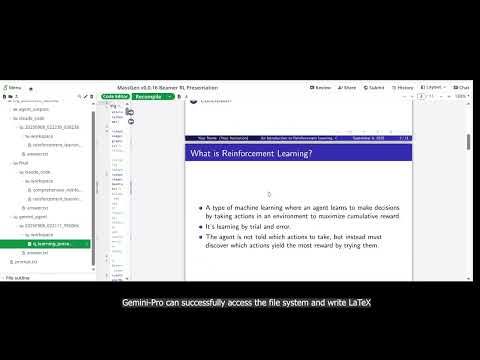
The test execution demonstrates:
- Parallel Agent Initialization: Both agents start simultaneously with filesystem access
- MCP Integration: Gemini agent successfully connects to filesystem MCP server
- File Creation: Both agents create LaTeX presentation files in their respective workspaces
- Cross-Backend Collaboration: Agents can access each other’s work through temporary workspace sharing
- Final Coordination: Claude Code agent reviews both presentations and creates a comprehensive combined version
📊 EVALUATION & ANALYSIS
Results
🗂️ Unified Filesystem Manager - The Core Innovation
Major Breakthrough: Introduction of the FilesystemManager class provides unified filesystem access (currently implemented for Gemini and Claude Code backends, with architecture designed for future expansion).
Key Evidence from Logs:
02:20:42 | INFO | [FilesystemManager.setup_orchestration_paths] Called for agent_id=gemini_agent, snapshot_storage=snapshots, agent_temporary_workspace=temp_workspaces
02:20:42 | INFO | [FilesystemManager.setup_orchestration_paths] Called for agent_id=claude_code, snapshot_storage=snapshots, agent_temporary_workspace=temp_workspaces
Implementation:
- Backend-Agnostic Design: Same filesystem interface for all backend types
- MCP Integration: Gemini agents now use MCP filesystem servers for file operations
- Workspace Management: Automatic workspace creation, cleanup, and path management
- Permission System: Inherited security model from Claude Code backend
Impact:
- Gemini agents can now create, read, write, and manipulate files just like Claude Code agents
- Consistent workspace behavior across different backend types
- Extensible foundation for adding filesystem support to any future backend
🤝 Cross-Backend Workspace Sharing
Revolutionary Capability: First-time cross-backend collaboration with shared workspace access.
Key Evidence:
[SYSTEM_FULL] ## Filesystem Access

You have access to filesystem operations through MCP tools allowing you to read and write files.

### Your Accessible Directories:

1. **Your Main Workspace**: `/workspace2`
 - IMPORTANT: ALL your own work (like writing files and creating outputs) MUST be done in your working directory.

2. **Context Workspace**: `/temp_workspaces/claude_code`
 - Context: You have access to a reference temporary workspace that contains work from yourself and other agents for REFERENCE ONLY.
Collaborative Workflow:
- Separate Main Workspaces: Each agent has their own working directory for creating original work
- Shared Context Workspace: All agents can access a temporary workspace containing work from all agents
- Automatic Synchronization: Orchestrator manages workspace snapshots and sharing
- Cross-Backend File Access: Claude Code can read Gemini’s LaTeX files, and vice versa
Result:
- Claude Code agent successfully accessed and analyzed Gemini’s Q-learning presentation
- Intelligent combination of both agents’ work into a comprehensive final presentation
- Seamless collaboration despite different backend implementations
🔧 MCP-Based Filesystem Operations
Technical Achievement: Gemini agents gain filesystem access through MCP protocol integration.
Evidence from Execution:
02:20:43 | INFO | 🔄 Setting up MCP sessions with 1 servers...
02:20:43 | INFO | Connecting to MCP server: filesystem
02:20:43 | INFO | Stream chunk [content]: 🔧 MCP: MCP configuration validated: 1 servers
02:20:43 | INFO | Stream chunk [content]: 🔧 MCP: Setting up MCP sessions for 1 servers
MCP Integration Features:
- Automatic MCP Server Setup: FilesystemManager automatically configures MCP filesystem servers for Gemini agents
- Security Validation: MCP security framework ensures safe filesystem operations
- Session Management: Persistent MCP sessions for efficient file operations
Technical Implementation:
- Gemini agents receive MCP tools like
mcp__filesystem__read_file,mcp__filesystem__write_file - Same permission model as Claude Code with
cwdworkspace restrictions - Clean abstraction allowing future backends to easily adopt filesystem capabilities
📁 Enhanced Workspace Management
Advanced Orchestration: Sophisticated workspace management and agent coordination.
Workspace Structure Created:
log_20250908_022042/
├── agent_outputs/
│   ├── claude_code.txt
│   ├── final_presentation_claude_code.txt
│   ├── gemini_agent.txt
│   └── system_status.txt
├── claude_code/
│   └── 20250908_022230_558238/
│       ├── answer.txt
│       └── workspace/
│           └── reinforcement_learning_presentation.tex
├── final/
│   └── claude_code/
│       ├── answer.txt
│       └── workspace/
│           ├── comprehensive_reinforcement_learning_presentation.tex
│           └── reinforcement_learning_presentation.tex
├── gemini_agent/
│   └── 20250908_022111_955066/
│       ├── answer.txt
│       └── workspace/
│           └── q_learning_presentation.tex
└── massgen.log
Enhanced Features:
- Agent-Specific Workspaces: Each agent maintains separate workspace directories
- Timestamped Versioning: All agent outputs saved with timestamps for traceability
- Final Workspace Copy: Winning agent’s workspace copied to
final/directory - Comprehensive Logging: Detailed logs of all filesystem operations and agent interactions
🤝 Cross-Backend Synthesis - Superior Through Collaboration
The Power of Unified Filesystem: Cross-backend collaboration produces results exceeding individual agent capabilities.
Implementation Differences
Gemini Agent’s Q-Learning Focused Approach:
- Focused 11-slide presentation on Q-learning algorithm
- Clear pedagogical structure with step-by-step Q-learning process
- Emphasis on Bellman equation and exploration vs exploitation
- Practical implementation focus
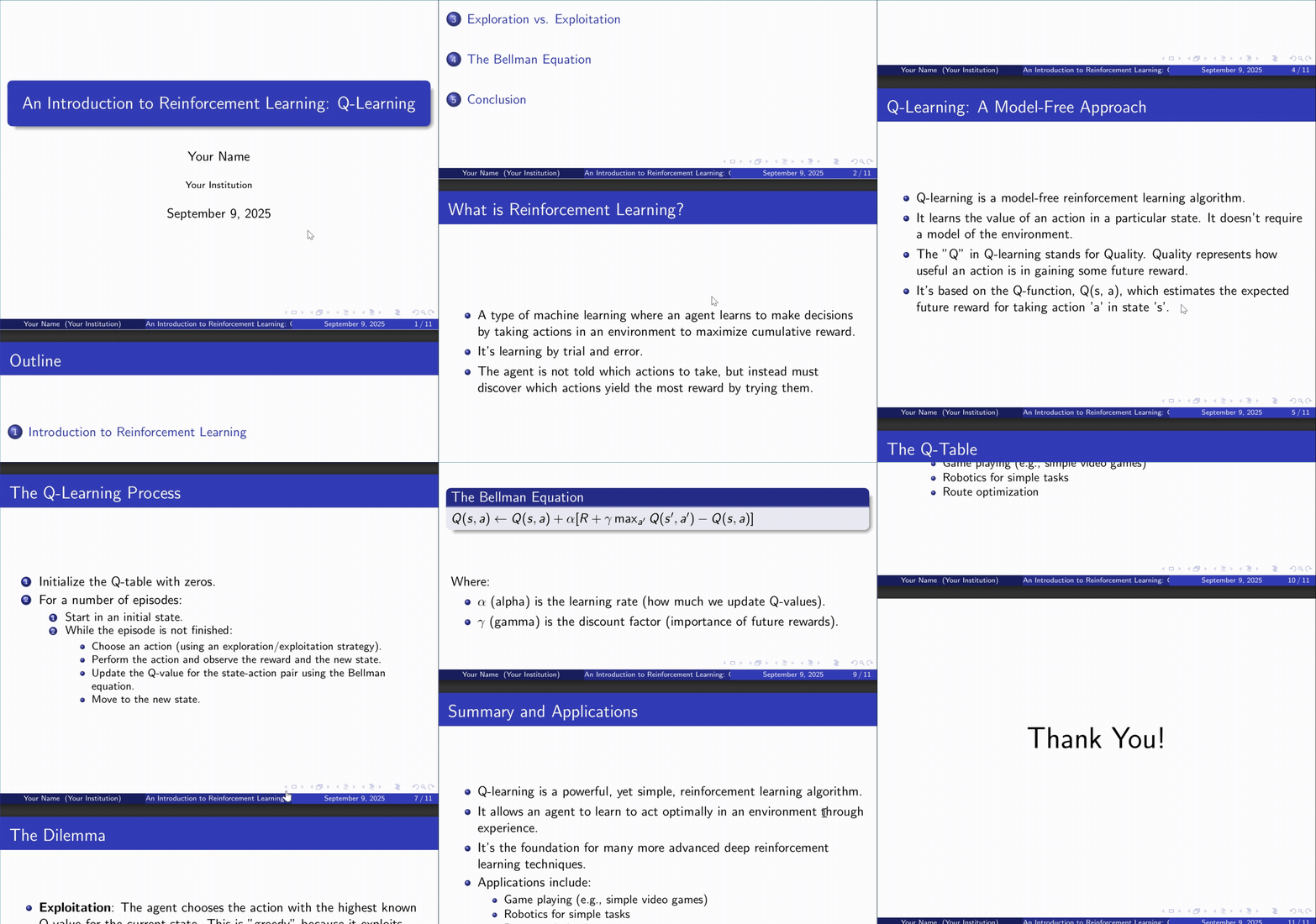
PDF Output: MassGen_v0_0_16_Beamer_RL_Presentation_gemini.pdf
Claude Code Agent’s Comprehensive Framework:
- Extended 22-slide presentation covering multiple RL algorithms
- Mathematical rigor with formal MDP framework
- Coverage of Q-learning, SARSA, Policy Gradients, and Actor-Critic
- Real-world applications and success stories
PDF Output: MassGen_v0_0_16_Beamer_RL_Presentation_claude_code.pdf
Final Synthesized Result
Cross-Backend Intelligence at Work:
Through the unified filesystem, Claude Code agent accessed Gemini’s work and created a superior 25-slide presentation that synthesizes both approaches:
PDF Output: MassGen_v0_0_16_Beamer_RL_Presentation_final.pdf
Synthesis Achievements:
- From Gemini’s Focus: Integrated clear Q-learning pedagogical flow and step-by-step algorithm explanation
- From Claude’s Breadth: Incorporated comprehensive RL algorithm coverage and mathematical formalism
- Emergent Quality: Created unified narrative that neither agent could achieve alone
Final Content Provenance:
\documentclass{beamer}
\usetheme{Madrid}
\usecolortheme{default}

\title{Reinforcement Learning: Algorithms and Applications}
\subtitle{A Comprehensive Introduction}
\author{Machine Learning Education}
\date{\today}

% 25 comprehensive slides synthesizing:
% - Gemini's pedagogical Q-learning approach (slides 9-13)
% - Claude's mathematical framework (slides 5-8)
% - Combined real-world applications (slides 18-20)
% - Unified advanced topics coverage (slides 21-24)
Quality Improvements Through Cross-Backend Collaboration:
- Educational Synergy: Gemini’s clear teaching approach enhanced by Claude’s comprehensive coverage
- Mathematical Integration: Gemini’s focused equations complemented by Claude’s formal framework
- Practical + Theoretical: Gemini’s implementation focus merged with Claude’s applications catalog
- Professional Polish: Both agents’ strengths unified into academic-quality presentation
🎯 Conclusion
MassGen v0.0.16 represents a fundamental breakthrough in multi-agent system capabilities by achieving true backend parity and cross-backend collaboration. The unified filesystem support eliminates the previous disparity between Claude Code and Gemini agents, enabling seamless collaboration regardless of the underlying backend technology.
Key Achievements
🔧 Technical Innovation
- FilesystemManager Class: Provides unified filesystem abstraction (currently Gemini and Claude Code, extensible to all backends)
- MCP Integration: Clean approach to filesystem operations via Model Context Protocol for Gemini agents
- Cross-Backend Workspace Sharing: First-time collaboration between Gemini and Claude Code backends
🤝 Collaborative Excellence
- Backend Parity: Gemini agents now have equivalent filesystem capabilities to Claude Code agents
- Intelligent Coordination: Agents can access, analyze, and build upon each other’s work across backend boundaries
- Enhanced Quality: Cross-backend collaboration produces superior results than single-backend workflows
📈 System Evolution
- Unified Configuration: Identical
cwdsyntax for Gemini and Claude Code backends (extensible to all backends in future) - Enhanced Orchestration: Sophisticated workspace management with automatic synchronization between supported backends
- Future-Ready Architecture: Extensible foundation designed to add filesystem support to all backends
Impact Assessment
This release transforms MassGen by enabling cross-backend collaboration between Gemini and Claude Code agents through unified filesystem support. The educational content creation task demonstrates how collaboration between these two backend types produces comprehensive, high-quality results that exceed what individual agents could achieve in isolation.
The v0.0.16 unified filesystem support establishes the foundation for expanding multi-agent collaboration. Currently supporting Gemini and Claude Code backends, the extensible architecture is designed to power all backends in future releases, positioning MassGen as the premier platform for complex, collaborative AI workflows.
📌 Status Tracker
| Feature | Status | Implementation | Notes |
|---|---|---|---|
| FilesystemManager Class | ✅ Complete | massgen/backend/utils/filesystem_manager/ |
Unified filesystem for Gemini & Claude Code |
| MCP Filesystem Integration | ✅ Complete | MCP server auto-configuration | Gemini agents gain filesystem access |
| Unified Configuration Syntax | ✅ Complete | Identical cwd support for Gemini & Claude Code |
Ready for future backend expansion |
| Enhanced Logging & Orchestration | ✅ Complete | Timestamped versioning | Comprehensive workflow tracking |
| Educational Content Case Study | ✅ Complete | 25-slide comprehensive RL presentation | Quality demonstrates collaboration benefits |
Overall Status: 🎉 Complete Success - All major v0.0.16 unified filesystem objectives achieved with demonstrated cross-backend collaboration excellence.